What I've learned designing agentic workflows for docs
Back in 2024 I wrote that AI helps me remove boring work at the margins. This is fine for a lone writer, but how to scale this to an entire team of technical writers? How to make the system helpful but not intrusive? These are all questions I’m starting to answer now, partly through experimentation, but also through dialogue with practitioners and colleagues. One answer I’m testing these days relies on GitHub Agentic Workflows.
A tiered approach to AI tooling for documentation
Following Four modes of AI-augmented technical writing, I thought of a way of distributing tooling effort across all modes through a tiered system where each level holds a different relationship with the writer. The result is four tiers: intake, local assistance, automated governance, and an MCP server that provides reliable knowledge to all. The idea is that AI assists the writer not just while writing, but also before and after they work on docs.
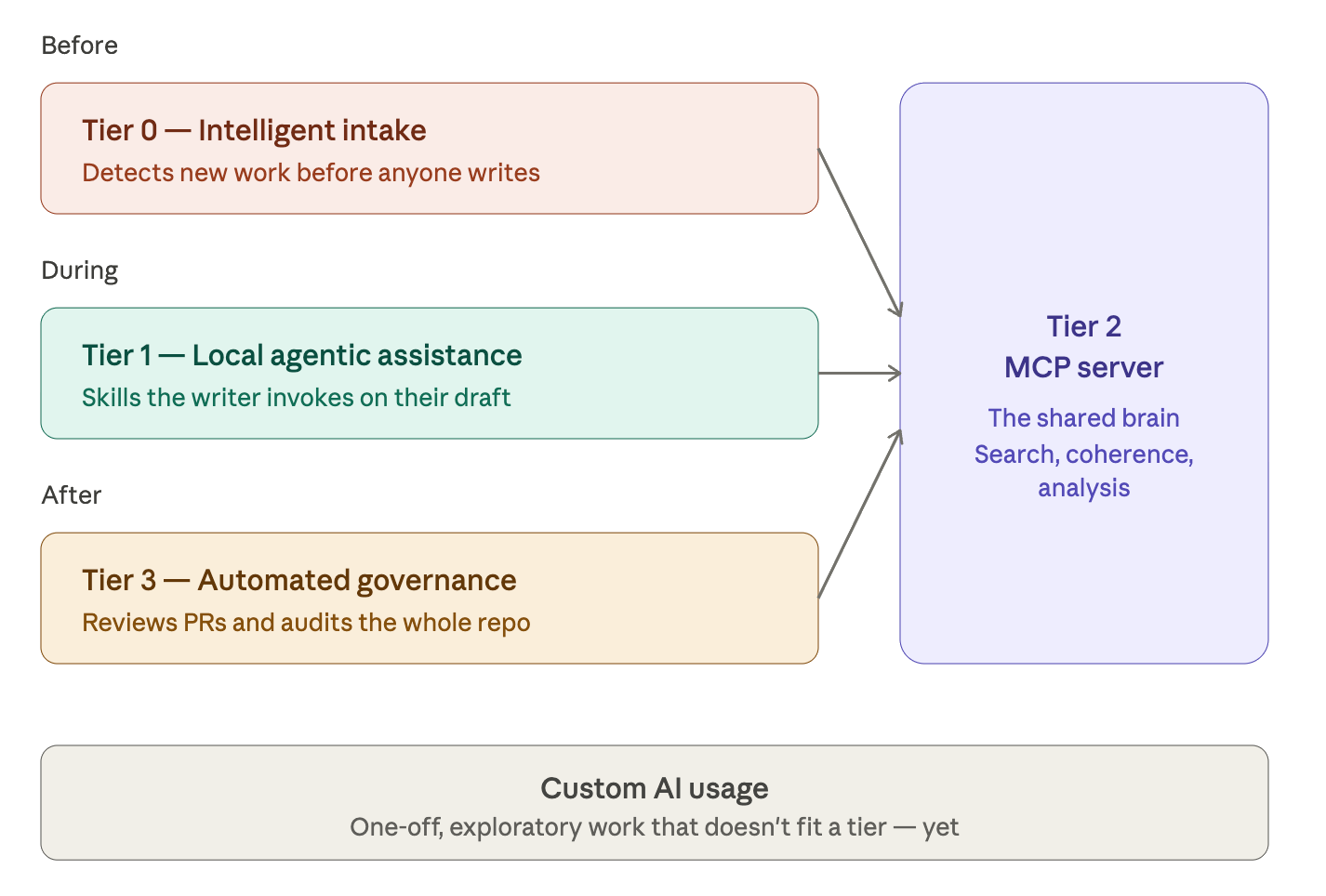
We had already built a docs MCP server, which acts as the knowledge layer, as well as agentic skills and tools for the local assistance. For the third tier, I’ve put in place several agentic workflows that run quality checks in our CI pipelines. They use a mix of deterministic tools, like Vale, Lychee, and Codespell, as well as non-deterministic LLM operations. These workflows rely on our public MCP server as the docs source of truth.
It’s basically a mix of all I’ve used throughout the years, held together by GitHub Agentic Workflows as the computational glue. Mixing dumb robots with smart ones, as I explained here, helps reduce false positives while ensuring complete scan coverage at the same time. It mostly works, with caveats, and the caveats are mostly because few people have tried this before (please send me links to more such examples in the wild).
Why use GitHub Agentic Workflows?
There are many ways of running LLMs in CI pipelines, for example through Claude for GitHub, or by calling an API. They are quite simple, but they might not always be secure. Agentic Workflows are different because of their security promise: they encapsulate an agentic run in layers of filters and firewalls to prevent sensitive data from leaking or data from being corrupted. The other advantage, of course, is that they run natively on GitHub.
The source of all agentic workflows, and here’s the beauty of it, are Markdown instructions with some YAML frontmatter. The concept rings a bell, right? It does: they’re essentially agentic skills with some boilerplate that allows them to be compiled into agentic workflows. The frontmatter part is needed because the engine that runs agentic workflows is the same that runs classic workflows. Here’s a simple AW:
---
on:
  issues:
    types: [opened]
---

# Issue Triage

Read issue \#${{ github.event.issue.number }} and add appropriate labels.
The gh-aw plugin then compiles the instructions into standard GitHub Workflows YAML, with or without GitHub scripts, that are triggered by events and perform one or more operations. If you look at an example compiled AW, you will notice that they’re very long and intricate YAML files with the .lock.yml extension. “Lock” here means you shouldn’t manually edit them. The GH-AW Playground helps you explore the compilation process.
Some key features make AWs different from skills. For example, you can use templating to introduce GitHub expressions into the workflow; you can add reusable fragments; and you can import skills and other files for your agent to use, which is quite useful in a multi-repo setup. Lastly, GitHub AWs support custom OpenTelemetry attributes, which enables observability into your AI ops. The closest to AWs are perhaps Claude Routines.
The main drawback with AWs is that their intricate security design frequently backfires. I’ve run into numerous bugs concerning paranoid safety; for example, I haven’t managed to correctly import agentic skills yet due to bugs in Microsoft Agentic Package Manager, which is the key component to handle file dependencies for agentic work. The good news is they fix bugs fast. They’ve already fixed 11 out of 13 issues I’ve filed so far.
On-demand, centralized, and half-deterministic
Our docs are spread across many repos, which is quite common in engineering-driven setups. The trouble is that content distribution makes tooling brittle: you don’t want fifty copies of the same agentic workflow drifting out of sync across fifty repos. The solution to that is hosting workflows centrally and reusing them through caller workflows.
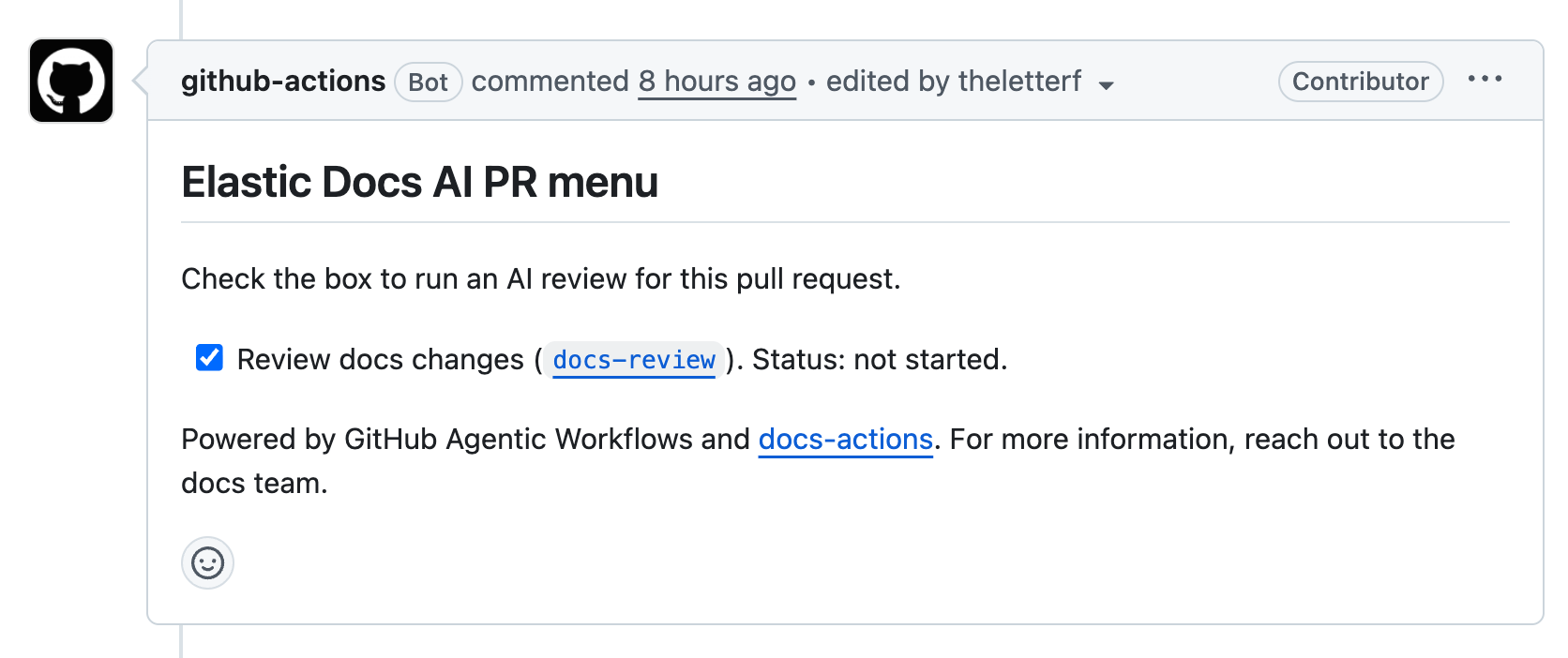
The workflows we’re hosting in the central repository fall into two families. The first is on-demand workflows that writers trigger through slash commands or by clicking checkboxes in a menu comment that gets automatically added to all issues and pull requests. Note that only users with write access to those repos can click the checkboxes, which is quite smart, security-wise.
docs-reviewchecks changed markdown files in a pull request, posting a non-blocking review with inline comments. A deterministic Vale pass runs first. The agent adds other checks on top.issue-scopereads an issue plus any linked PRs or commits and writes a concise scope block back into the issue body: what to document, where, and what’s already covered.issue-triageapplies team labels to incoming issues using the repo’s CODEOWNERS plus the Elastic Docs MCP server for ownership context. This is a chore we’d gladly offload to AI.
We call these workflows through on-demand menus: docs-ai-menu for issues and docs-ai-pr-menu for pull requests. Both post a comment with a checklist of available actions. You check a box, the corresponding workflow fires. The reason for the menu is partly cost and partly trust. I’d rather have a human ask for a docs review than have one auto-run on every PR.
The second family is the quality sweeps, scheduled or dispatched audits that file structured fix-issues against the docs corpus. For now they’re invoked manually, though in the future we could schedule them to execute at regular intervals, perhaps wiring them directly to other fixer agents to carry out improvements (but always after a human approves the proposal).
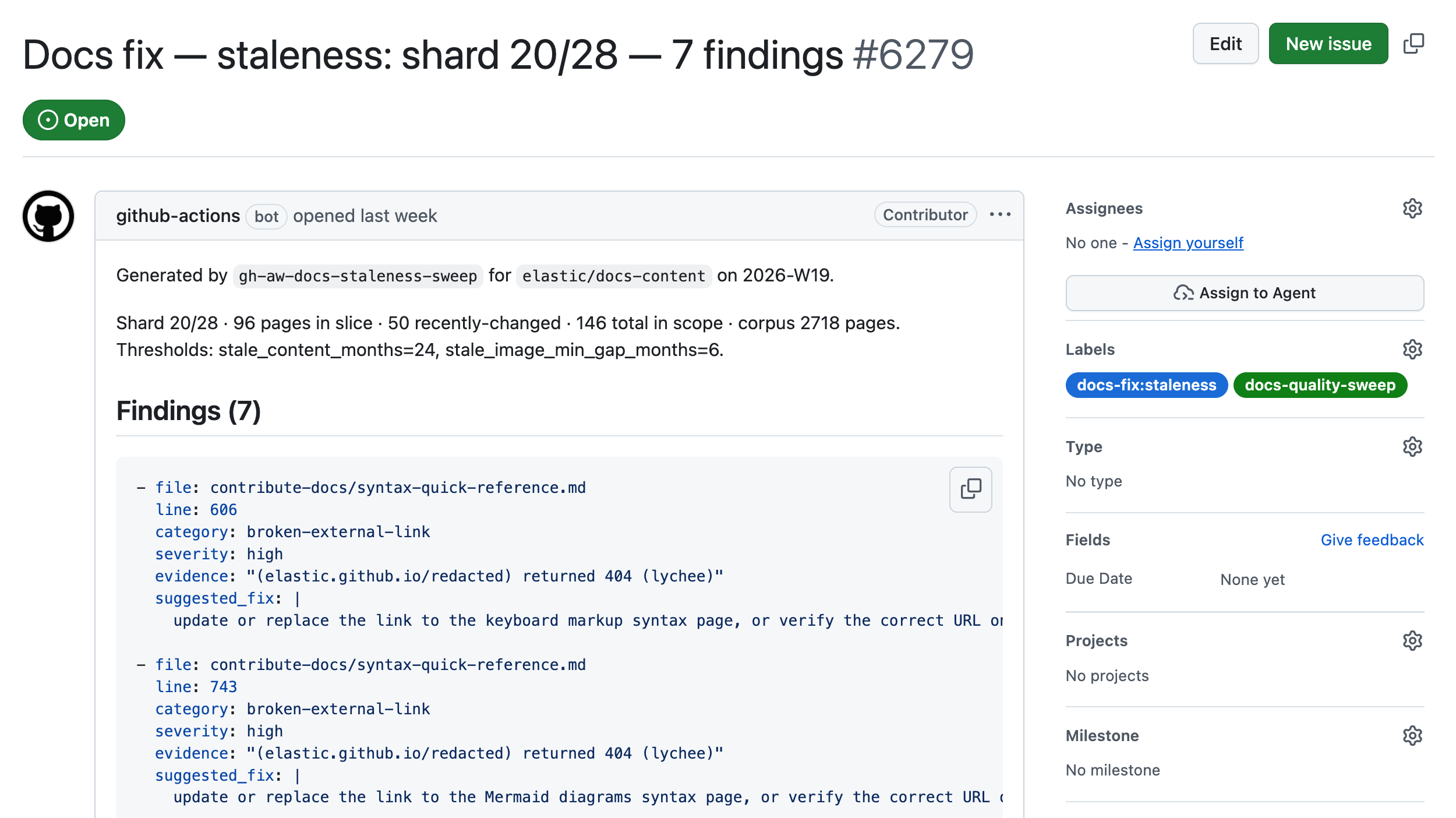
The quality sweeps I’ve created so far are the following:
frontmatter-sweepaudits required frontmatter keys, description quality, and navigation titles.applies-to-sweepvalidates the applies_to keys we use to mark cumulative-docs applicability.openings-sweepaudits H1 specificity, opening paragraphs, and “Before you begin” sections.style-sweepruns Vale and adds high-confidence manual style findings on top.typos-sweepruns Codespell and lets the agent filter false positives. No LLM is used for detection.staleness-sweepflags pages older than a threshold, screenshots that haven’t kept up with their docs, broken external links (through lychee), and references to product versions past EoL.coherence-sweepcompares each in-scope page against the published corpus through MCP and flags duplicates, near-duplicates, and contradictions.
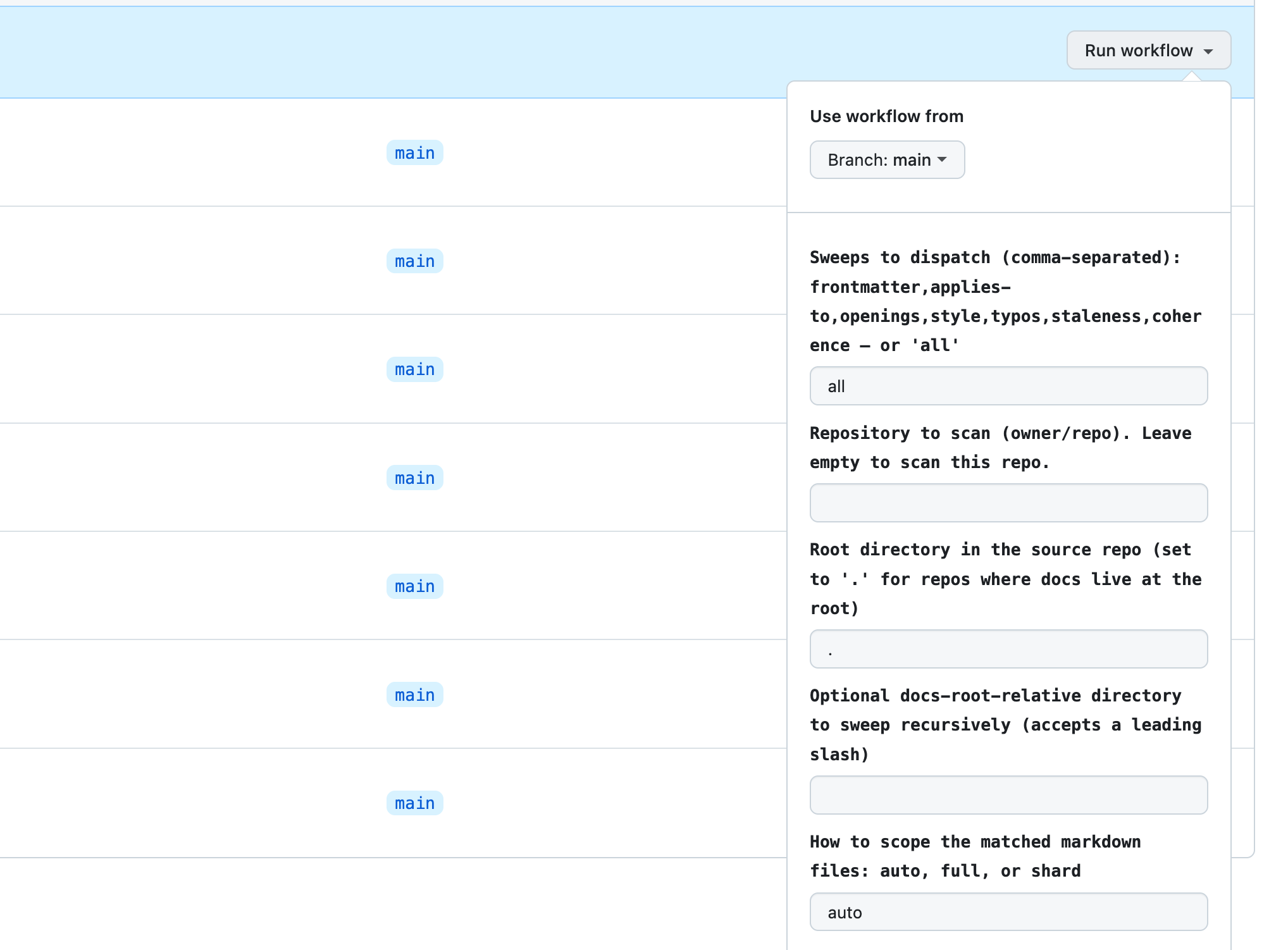
How are the sweeps called? The quality sweep caller dispatches the orchestrator with the right inputs for our setup: source repo, target path to scope to a subtree, scope mode to choose between full scans and sharded ones. A repo-wide sweep on every commit would be expensive and slow, so the inputs let humans decide what gets scanned and how.
Every sweep is deterministic-first: Vale, Codespell, Lychee, and git log do the mechanical work in pre-steps, and the agent receives their outputs as context. The agent’s job is to filter rather than find things deterministic tools can detect far more reliably and a thousand times more cheaply. This is far more powerful than running deterministic or LLM-powered checks in isolation.
The docs MCP server is used for the kinds of questions only the published corpus can answer: which versions are still supported, what sibling pages already cover this topic, whether two pages contradict each other. I appreciate it when AI doesn’t have anything to say, so when the agent can’t verify a finding with confidence, it silently ends.
Whereof one cannot speak, thereof one must file a noop.
What I’ve learned and where this is going
So far, the results are quite promising. While the writers stay in control, they obtain information and valid feedback they can quickly apply or, if they’re in a hurry, assign to LLMs to act on. I did that with the first round of typo findings and it worked well. The question of what else I’d assign to an agent based on AI findings remains open, though. It’s a governance and strategy problem.
From the technical point of view, the mix of deterministic and probabilistic approaches in the same workflow is superior to others, so I strongly recommend that you don’t throw away your classic CLI tools: pipe their output to LLMs instead. Another conclusion is that a docs MCP server is the auxiliary knowledge storage that can make the difference between an amnesiac workflow and one that knows where to look for evidence.
The next step for me could be to get more observability into how the agentic workflows perform and what steps could be made more efficient. At the same time, I want to better grasp the cost implications for a scenario where agentic workflows are running several times per hour, every day, the whole year. As we exit the age of subsidized AI compute, when and how we’re running agentic workflows becomes a non-trivial matter.
A final note: Something that surprises me is how much of the work I’m doing is not so much about AI as it’s about building elaborate pipes and fences around it, to call it only when needed and to feed it the best context and nothing else. I would call this engineering, though I’m still not sure of which kind. If one squints, it looks less like mundane automation and more like a hi-tech editorial board. Wild times.